
Why Are My Emails Going to Spam? And How to Fix it in 2026

 Paul Newham

I’m going to take a wild guess about why you’re here. You’re having deliverability problems with your emails, right? Maybe your open rates and click rates are way down. Maybe you’ve even done an inbox placement test. And the results spell it out. Lots of your emails are getting sent straight to junk, never to be seen by the recipient.
So here you are, scratching your head. Why are my emails going to spam?
Well, that’s what I’m here to answer. I know your pain. I’ve fixed more than my fair share of spam issues in my 5+ years in email marketing. So I want to share with you what I’ve learned about spam filters and how they work. What causes them to mark your emails as junk. And, most importantly, how you can fix it.
What are Spam Filters?
Spam filters are the security guards of the email world. Their job is to protect your inbox from phishing and spam emails. They do that by looking out for anything that looks dodgy. And then either blocking that email entirely. Or sending it to the spam folder.
Spam filters come in different types and work in different ways. The most common are those built into email clients like Gmail or Outlook. These are known as server-side or hosted spam filters. They operate on mailbox servers. And the mailbox provider configures and controls them. This gives you automatic and often free protection. But you get limited control over what to filter. And what to do with rejected emails.
If you want more control over your inbox security, there are two options. You can install your own client-side spam software on devices. Or you can install a physical gateway spam filter on your servers. Both do the same broad job. They check emails as they come into your premises or devices. And give you lots of room to customize spam monitoring. But they cost extra. And require setting up and updating.
So how does filtering work? Spam filters look at three key areas when assessing whether or not an email is spam:
- Sender reputation and behavior: Spam filters gather and assess data about a sender’s IP address and domain. They look at factors like the history of spam complaints against that IP or domain. Whether they’re listed on any spam blacklists. How many emails are sent and how often (spam filters are suspicious of very frequent high-volume sending). They also consider historical open and click rates. A domain that sends lots of emails no one opens is a likely candidate for sending spam. And they test list hygiene practices by looking for how many emails get sent to spam traps. Spam traps are fake email addresses placed by inbox providers. They catch people out for sending to addresses without opt-in, the definition of spam. From all of this data, spam filters give IPs and domains a sender reputation score. A high score/reputation gives you a great chance of being waved through into the inbox. A low score makes it very likely you’ll be blocked.
- Technical configuration: Phishing emails are notorious for using tactics like ‘spoofing’ genuine email accounts. They can look very much like the real thing on the surface. And pose a big problem to unsuspecting recipients. But there are often giveaways that they are fake in the technical setup of the email. Examples include authentication records for a domain being incomplete or incorrect. Or mail exchange (MX) routes not matching the records of an IP address. Information like this is stored in the metadata contained in an email header. So the spam filters that assess these things are called header filters.
- Content: Spam filters look for cues in the content of an email that suggest it is spam. Examples include spam trigger words and phrases often linked to unsolicited selling. Spam filters are also suspicious of large image or attachment files, or too many images. These can be used by phishers to carry or hide malicious code. Other giveaways include poor design and broken HTML code. The latest AI spam filters use data from known examples of spam to ‘learn’ the tactics many spammers use. They rely on increasingly sophisticated algorithms to analyze how spammers send emails.
11 Reasons Why Emails Land in the Spam Folder and How to Fix Each
1. Your email authentication fails
Email authentication helps inbox providers and email marketing platforms validate legitimate senders. There are 3 main types of authentication:
- SPF (Sender Policy Framework): If you own an email domain, you can use SPF to list all IP addresses and sources authorized to send your emails. Spam filters use this list to cross-check IP addresses against domains.
- DKIM (Domain Keys Identified Mail): This is a cryptographic method of ‘signing’ an email with a digital signature when it’s sent. When DKIM is set up, every email sent from a server is ‘signed’ with a special hash or code. The code contains a private key unique to the sending service. And details about the email’s content. The receiving server then reads the code using a public key contained in the sender’s DNS record. There has to be a match between the two keys for the receiving server to be able to read it. This tells the server if the email comes from where it says it does.
- DMARC (Domain-based Message Authentication, Reporting, and Conformance): DMARC is like a follow-up to SPF and DKIM. It reports on authentication status. And tells mail servers what to do with emails that fail authentication. Reject them. Quarantine them in the spam folder. Or let them through into the inbox anyway.
The main idea behind authentication is to catch spoofed and altered emails. But you can fail by not having SPF or DKIM records set up or managed correctly. You can check this by looking at your DMARC reports. These contain details about why SPF or DKIM authentication fails.
How to fix
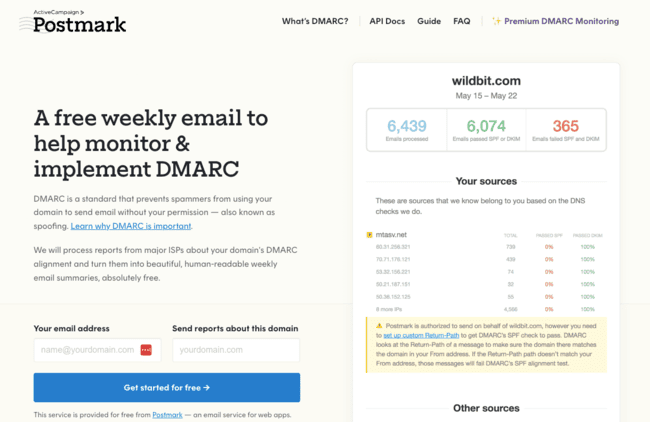
There are lots of tools available to check if your emails are properly authenticated. MxToolbox lets you run a long list of authentication checks for free, simply by typing in a domain. Bouncer has an inbox placement testing service that includes regular authentication checks. Or Postmark offers a free DMARC monitoring service. You add a domain, and it returns weekly DMARC reports. This way, you see whether there have been SPF or DKIM failures from emails you sent that week. Once you know authentication is causing spam issues, you can fix it through your email sending service.
2. You don’t keep your email list clean
List hygiene is important to maintaining good email deliverability. And keeping your emails out of spam.
A ‘clean’ contact list is one where all the email addresses on it are genuine and active. There’s no obvious reason why your emails won’t be delivered to these addresses.
Emails sent to fake, inactive, and invalid addresses will bounce. The more of these addresses you have in your list, the more bounces you get. And spam filters factor in bounce rates when judging overall sender reputation. So the less ‘clean’ your list is, the more bounces you have, the lower your sender reputation will be. And that increases the chances of your emails being flagged as spam.
How to fix
Keeping a list clean means running regular verification on your lists. Email verification means checking that an address is active and working. And most importantly, that emails you send to it won’t bounce. With email verification tools, like Bouncer, you can run bulk verification checks for your whole email list. It tells you in simple terms whether an email address is ‘deliverable’, ‘risky’, or ‘undeliverable’. And has a 99%+ accuracy rate. It also automatically removes ‘bad’ emails from your list. Google’s Postmaster Tools monitor spam rates, domain reputation, and delivery errors directly from Gmail’s perspective.

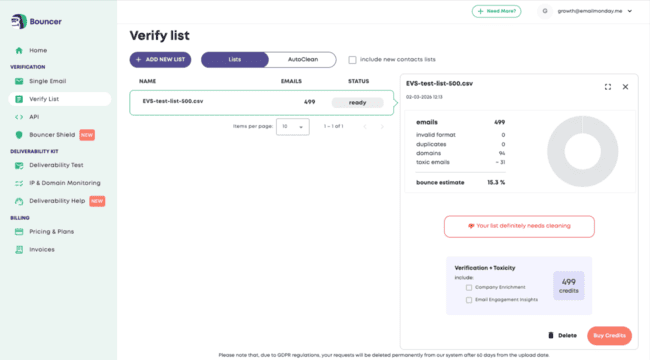
Read our full Bouncer review to find out more about how it helps you avoid the spam folder.
3. Your IP has a bad sender reputation
All emails are sent from a server. And every server has an IP address. Many large email service providers (ESPs) use multiple servers for sending. Which means multiple IP addresses. And this server infrastructure gets shared across all of a service’s users. So any one IP address could be linked to emails from hundreds of different senders.
This is good for keeping email cheap. But if the email service provider isn’t careful about who can send from their IPs, it can hurt sender reputation. It only takes one user to start getting flagged for sending spam. Or to have suspicious sending behaviour, or sky-high bounce rates. And it affects the sender reputation of the whole IP address.
If the reputation of an IP address gets really bad, it gets added to a blocklist. This is basically a ‘wanted’ list for spam filters. They look up the IP addresses involved in any email received against these lists. If an address is on there, it’s instant bounce or quarantine. It doesn’t matter if you’re the spam culprit or not. If an IP address is on a blocklist, spam filters don’t take any chances.
How to fix
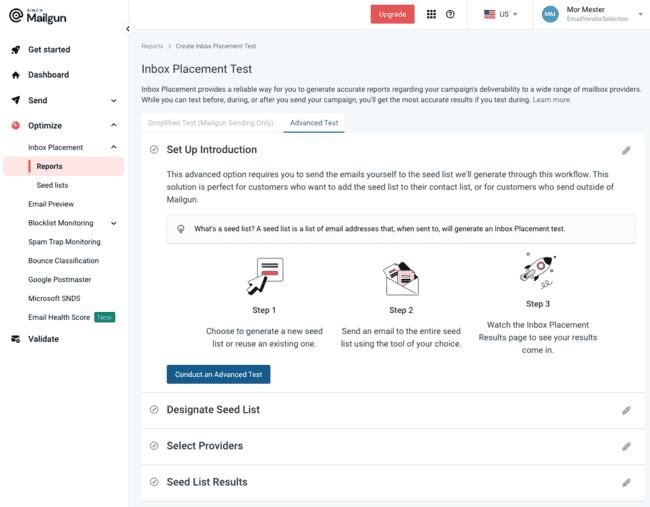
The best defence against a poor IP reputation or blocklisting is vigilance. Use trustworthy newsletter software and an IP reputation monitoring tool to check the IP addresses used to send your emails. Bouncer includes IP monitoring in its Deliverability Kit. MxToolKit has a blocklist look-up widget in its long list of free tools. Mailgun Optimize provides detailed and developer-friendly IP reputation analysis. But it’s pretty expensive.

Finally, you can avoid the risks posed by shared IP addresses by purchasing a dedicated IP of your own. This puts you in full control of your IP’s sender reputation. But it is expensive and only recommended for high-volume senders.
4. Your domain has a bad reputation
You can’t have full control over IP reputation without buying a dedicated IP address. But you are in full control of your sending domain’s reputation. Your email domain is the part of your email address after the @ symbol. As a business owner, you should have your own custom domain.
It also allows spam filters to monitor your sending behavior. And there’s a list of things that can cause your domain reputation to get marked down. If you have high bounce rates or people flag your emails as spam, that goes against your domain. If you don’t keep up with your list hygiene and send to dud addresses or spam traps, same story. And if you don’t keep on top of domain authentication, that’s another black mark. The lower your domain’s sender reputation goes, the more of your emails will be filtered to spam. And if your domain gets a really bad rep, it could end up on a blocklist.
How to fix
Protecting or improving your domain reputation depends on doing all the right things. So this whole list of tips is your ‘how to fix’ guide! Lots of deliverability monitoring platforms have tools for evaluating your domain reputation. Good examples include Bouncer’s Deliverability Kit, Mailgun Optimize, and GlockApps.

5. Recipients marked your emails as spam
One of the most damaging things for sender reputation is when contacts flag your emails as spam. This is a huge red flag for spam filters. If actual recipients are sending your emails to the spam folder, you must be sending spam. You know where future emails are going to end up!
How to fix it
There are three main ways to stop your emails being flagged as spam:
- Send to an engaged audience. That means avoiding half-hearted or forgotten sign-ups. These are the kind of people who decide they have no interest in your emails. Even if they did fill in a form. You can reduce them by using double opt-in on all forms.
- Keep your emails relevant and engaging. That starts with being transparent about what your emails are for. Subscribers will lose patience if you promise insightful news updates. But actually send lots of product promos. Collect as much data about your contacts as possible. Use it to segment and personalize to keep your emails relevant. And focus on quality.
- Include a visible unsubscribe link in every email. If people don’t want to receive your emails anymore, let them leave. If you keep sending, you are technically sending them spam. And if they call you out on in… well, we know how that goes for your sender reputation.
6. Your forms are not protected
We’ve talked about why poor list hygiene causes more emails to go to spam. Sending to defunct, broken, or fake email addresses causes bounces. And high bounce rates hurt your sender reputation. But wait a minute… how do fake email addresses end up in your list, anyway?
The same way most email addresses end up in your list. Sign-up forms. Forms are the default way to capture new leads. They’re easy, and they work. But the downside is, you don’t know who’s using them. Anyone can come along and type in a fake email address. A lot of people do this to get the giveaways used to coax people into signing up. Another big problem is bots ‘spamming’ forms with fake or fraudulent email addresses.
How to fix it
You can avoid people adding fake email addresses by using double opt-in or CAPTCHA on forms. Using a fake address means you can’t confirm the subscription via email. Similarly, you can protect your forms against bots by adding a CAPTCHA test. These confirm that users are human by setting a challenge that bots can’t interpret.
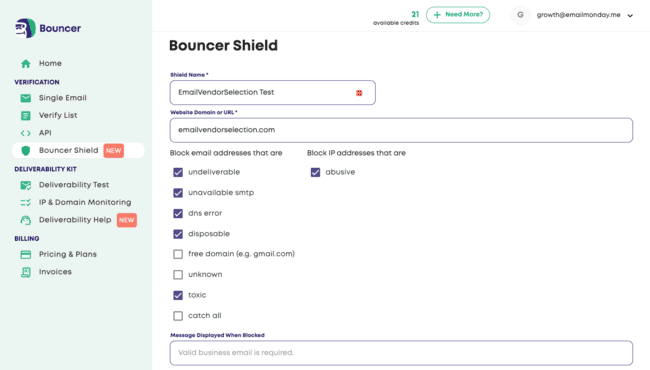
To fully secure your forms, consider adding email verification to your sign-up workflow. With Bouncer’s Shield tool, for example, you can validate every new address that gets added. That way, bad emails don’t make it into your list.

7. Your reply-to isn’t a working email address
‘No-reply’ email addresses are popular with businesses for sending transactional and marketing emails. You can add them as an optional reply-to address when setting up an email. They avoid company inboxes from becoming clogged up with unnecessary replies.
But spam filters don’t like them. There’s a high correlation between no-reply addresses and unsolicited emails. It’s also easy for spam filters to check if a reply-to address is genuine or working. If not, the email goes to the spam folder.
How to fix it
The simplest fix is to always leave the address you send from as the reply address. If you need to use another one, set up a dedicated inbox to receive replies. Regularly empty it and check that it’s working. Full inboxes cause bounces. And that can be picked up by spam filters, too.
8. Your emails don’t include a plain text version
Email marketers know there is a lot of pressure to ‘stand out in the inbox’. To grab attention, you need to look good and tick the right boxes on quality. That’s why HTML designs dominate promotional emails.
Yet not all inboxes accept HTML emails. HTML can be used to hide malicious code. So organizations and individuals might choose to reject HTML emails for security reasons. Other people might prefer plain text emails for accessibility. They are easier to read.
Whatever the reason, HTML emails sent to these inboxes will bounce. That’s not great for your sender reputation or delivery rates. Worse, some spam filters view HTML-only emails as suspicious. Why don’t they want to reach every inbox possible? Why do they need to send HTML only? What’s hidden in the code?
How to fix it
In a lot of cases, plain text versions of HTML emails are generated and sent automatically. So just don’t switch the plain text version off! But don’t take it for granted. Check your sending settings and make sure plain text is on, too.
9. You use link shorteners
Link shorteners turn long links into shorter, snappier text. They are popular in SMS and social marketing, where character space is at a premium. But you should avoid them at all costs in email marketing. Phishers are notorious for using URL shorteners to hide malicious links. It’s so common that ESPs often blacklist a domain just for sending an email containing a shortened link.
How to fix it
This one’s very simple. Just never use link shorteners in your emails!
10. You send too many attachments
Like link shorteners, spam filters are very suspicious of email attachments. They’re fine on one-to-one emails between regular contacts. But even sending a first email to someone new with an attachment can alert spam filters. Bulk emails with attachments are a huge red flag. Attached files are the easiest way to spread malicious code via email. So most spam filters just automatically block any bulk emails with them.
How to fix it
If you have material you want to share via email, you don’t have to attach it as a file. Upload the file to your site and share a link in your email.
11. You’re not following email HTML best practices
We’ve talked about why HTML is popular for email marketing. But it can be a double-edged sword. Sure, good designs cut through and engage readers. Yet HTML emails are put under more scrutiny by spam filters than plain text emails. Why? Because HTML can be used to hide and distribute malicious code. And phishers rely on HTML to spoof the appearance of branded emails.
Spam filters penalise emails with incomplete, broken, or overly complex HTML code. These are signs that code from a genuine email might have been crudely copied and repurposed. Or that the build job has been automated and poorly tested. Large, complex HTML files are prime candidates for hiding malicious code. Especially if it’s packed with images.
Spam filters look at how an email conforms to professional coding standards. That includes things like setting the appropriate doctype. Correct use of headers and meta tags. Using CSS in-line. And being responsive and accessible. Not following these best practices or shoddy coding could trigger spam filters.
How to fix it
Use a spam test tool to check how spam-compliant your HTML is. Tools like GlockApps and Validity Everest analyze your code the way a spam filter would. They flag up flaws and give you the chance to fix them before sending.
It’s Easy to Avoid the Spam Folder with Good Sending Practices
Deliverability issues are frustrating. Having a lot of emails landing in junk means a lot of wasted effort. But the good news is, it’s easy to fix. Yes, there are lots of reasons why spam filters might jump on your email. But passing the spam filter test isn’t that difficult. It’s mostly a case of following good email sending practices. There’s nothing too technical or challenging about it.
Start with email authentication. Missing or incorrect SPF or DKIM records are a big red flag to spam filters. Authentication is used specifically to weed out fake and spoofed emails. So if you don’t get it right, don’t be surprised that your emails get rejected.
If your authentication is on point, good email deliverability depends on two things. Sending to an engaged audience that wants to receive your emails. And protecting the reputation of your IP addresses and domain. That’s why good list hygiene is so important. Verifying email addresses reduces bounces and avoids sending to spam traps. You can use a tool like Bouncer to clean lists and check every new subscriber. You should also back this up with double opt-in on your forms. That way, you know you’re sending to genuine people who want your emails. That keeps your open rates and your reputation high.