
Mailjet Review 2026: Honest Results from our Hands-On Testing

 Paul Newham

Sinch Mailjet is a well-known email marketing software. Quite affordable and easy to use, it’s popular with businesses of all sizes, especially those with developer expertise to use its API.
With Mailjet, you get unlimited contacts, a free forever plan, and email validation. So is Mailjet the email marketing platform for you?
Email marketing platforms evolve quickly, so I updated our review of Mailjet to see how it performs today. With the new navigation, automation tools, analytics, and deliverability. I signed up for Mailjet plan for testing. Having reviewed more than 30 email marketing services, we have a clear benchmark for comparison.
Mailjet Review Overview
- Mailjet is a solid, budget-friendly email marketing platform with over 100K customers across 150 countries.
- Mailjet stands out on deliverability. It runs on large email delivery infrastructure and has built-in email validation to protect sender reputation.
- Prices start at $17/month. Unlimited contacts on every plan makes it a strong fit for growing lists on a budget. The free plan has 1,000 contacts, 6,000 emails.
- We find Mailjet works well for both marketers and developers. The email editor is simple, intuitive, and easy to learn. The API gives developers serious flexibility for transactional email and custom integrations.
- Automation has improved a lot recently with the new visual workflow builder, behavioral triggers, and webhooks.
- You also get advanced analytics, including click maps and bot activity filtering.
👉 If you want an affordable email marketing tool with strong deliverability, solid analytics, and developer-friendly features, Mailjet could be a great fit.
Mailjet’s Core Features
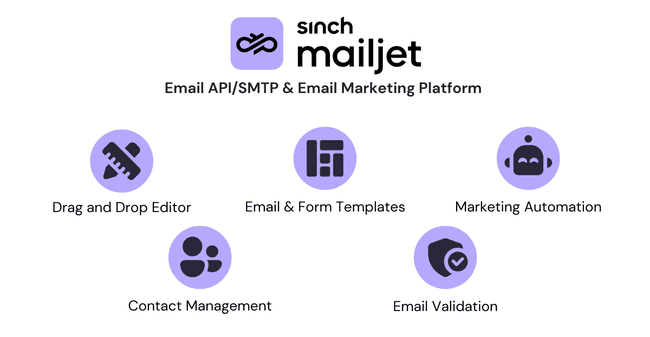
Here are the main features I focused on:
- Drag and drop email editor: Mailjet’s email builder is simple and has an easy-to-learn interface.
- Templates: There are 70+ email templates to choose from. The designs are mostly simple and easy to customize.
- Automation: Automation tools have improved a lot. You get a visual workflow builder with triggers based on contact activity, conditions, and 12 workflow templates.
- Contact Management: You can create as many contact properties as you like. This carries through into very customizable segmentation. The AI segmentation is the cherry on top.
- Email validation: Mailjet’s email validation is a real USP compared to most email marketing services.
- Other channels: There are APIs for transactional emails and SMS messages.
Get started with Mailjet for free
Mailjet Pros and Cons
Pros
- High deliverability: Email validation, visual email check, and domain authentication all contribute to great deliverability rates.
- In-depth analytics: Sinch Mailjet tracks lots of metrics and digs deep into performance with detailed breakdowns.
- Unlimited contacts: Mailjet is priced affordably and comes with unlimited contacts on every plan. This means there’s never any ceiling on growing your lists.
- Visual automation builder: Mailjet’s workflow builder makes it easy to create automated journeys using triggers, conditions, and templates.
- Collaboration: Sinch Mailjet has user management and collaborative editing. It lets you set permissions on who can edit templates, automations, contacts, transactional emails, and statistics.
Cons
- Not enough template variety: The 70+ templates are clean and functional, but the design selection isn’t as extensive or visually polished as some competitors.
- Automation is only available in the Premium plan: The automation builder in Mailjet improved a lot, and we’d love to see it included in the Essentials plan, too.
Is Mailjet for you?
Recommended if:
- You want an affordable way to grow your email marketing. Sinch Mailjet is priced for SMEs. Unlocking all features on its Premium plan only costs $27/mo for 15K emails. Unlimited contacts mean you can keep building your lists without limits.
- You have developer expertise close to your team. Mailjet is targeted at both marketers and developers. It’s an easy, accessible tool for marketing teams. But with its API, you can unlock even more.
- High deliverability is a high priority for you. With a great sending infrastructure behind it, Sinch Mailjet has excellent deliverability credentials. It’s one of the few email marketing platforms that offers email validation. Mailjet also has deliverability experts to help you protect your sender reputation and improve inbox placement.
Not recommended if:
- You’re looking for more advanced automation. Sinch Mailjet improved its automation with a new builder and lots of new features recently. It’s good enough for most SMBs, but if you need advanced workflows, check out ActiveCampaign.
Mailjet Rating at a glance: how does it perform?
Ease of Use   | Sinch Mailjet is very easy to use. I like the simple, clear interface. And the consistency across different editors. I think some features could be easier to find. |
Email Editor  | The email builder is easy to use. However, showing what section you are working in could be clearer. |
| Email Templates | There are 70+ email templates. They’re simple and of reasonable quality. So you’ll have to bring some magic if you want to send eye-catching designs. |
| Email Types | Sinch Mailjet has newsletters, automated emails, transactional emails, and RSS emails. |
Marketing Automation  | Mailjet’s automation tools have improved a lot. You can build automated workflows using triggers, conditions, timers, and templates. The visual workflow builder makes it easy to create workflow based on contact behavior. It’s customizable enough for most marketers, while remaining simple and easy to use. |
List Management  | You can custom build contact properties to store any data you like about your contacts. That makes for very flexible segmentation. But it all has to be done manually. |
| Personalisation | Sinch Mailjet supports personalization using contact properties and dynamic content blocks. You can display different content to different audiences within the same email based on contact data or behavior. Combined with flexible custom properties and AI segmentation, this makes targeted messaging easy. |
| Landing Pages & Forms | Having the same editor for forms, landing pages, and emails makes life easier. All Mailjet sign-up forms are double opt-in. I’d like to see reCAPTCHA, more form and page templates, though. |
Reporting & Analytics  | Sinch Mailjet digs deep into performance analytics. It tracks 10 email/campaign metrics for every email sent. And breaks the data down in lots of different ways. Bot detection and filtering help keep your data clean and actionable. |
| Customer Service | Mailjet relies on its user guides and email support tickets for lower-cost plans. A virtual assistant helps you find what you need. It’s a shame phone and live chat support are only available to users sending 50k+ emails. |
Deliverability  | Sinch Mailjet has excellent deliverability. Built-in email validation, domain authentication, and detailed deliverability analytics help maintain a strong sender reputation. Case studies show strong real-world performance. Outdooractive achieves over 96% deliverability while sending millions of personalized emails weekly. My AskAI relies on Mailjet’s API to deliver real-time AI email replies reliably. |
| Spam & Design Check ✔️ | Mailjet includes tools to improve inbox placement and email quality. Email validation identifies invalid addresses before sending. Spam-sensitive elements like authentication and engagement tracking for a healthy sender reputation. |
| AI Writing ✔️ | Mailjet is particularly well-suited to privacy-conscious businesses. As a European provider headquartered in France, it operates under strict GDPR requirements. Features like double opt-in forms, exclusion lists, permission controls, and detailed contact data management help businesses maintain compliance and protect user privacy. |
| Integrations & API ✔️ | Mailjet offers 29+ direct integrations and 8,000+ through Zapier. Developers can connect Mailjet to any tool with the API. This allows reliable transactional email sending and custom automation triggers. |
| User Permissions ✔️ | Mailjet has role-based and custom user permissions. You can assign roles like marketer, developer, designer, or accountant. This works well with Mailjet’s collaborative editing. Teams can work together on campaigns while restricting access to sensitive areas like billing or sending. |
| GDPR & Legal Compliance ✔️ | Mailjet is particularly well suited to privacy-conscious businesses. As a European provider headquartered in France, it operates under strict GDPR requirements. Features like double opt-in forms, exclusion lists, permission controls, and detailed contact data management help businesses maintain compliance and protect user privacy. |
| Interface Languages ✔️ | Mailjet is available in 9 languages, including English, French, Spanish, German, Italian, Portuguese, Danish, Swedish, and Dutch. Combined with localized documentation in 5 languages and live Email Academy training sessions in 4, the platform works well for international teams. |
| Customer Satisfaction | Customer reviews rate Sinch Mailjet as 4.2 out 5 on Capterra and 4 out 5 on G2. |
Overall Score


Sinch Mailjet delivers excellent value for money. Unlimited contacts, strong deliverability, flexible segmentation, and a powerful API make it a compelling email marketing and transactional email platform. Automation is improving but still less advanced than specialist marketing automation platforms. It’s a good choice for businesses focused on reliable, affordable email marketing.
Getting Started with Mailjet

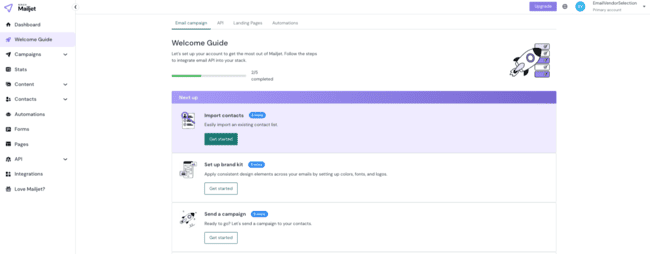
Mailjet is an email system that works for marketers and developers. As a marketer, I’d say a key USP is simplicity. I got that impression right from the sign-up process. It’s very quick to get started with Mailjet. You just fill in your details and activate your account via email.
Next you’re taken straight into a Welcome Guide. I’m always a fan of these as they help you get started. And give you a chance to play around with key tools. In Mailjet, the prompts are for creating and sending a test campaign. Importing a contact list is a basic early step.
You’re also asked to add and authenticate your email domain. This is where things get a bit more technical. But email authentication using SPF/DKIM helps to protect your sender reputation and improve deliverability.

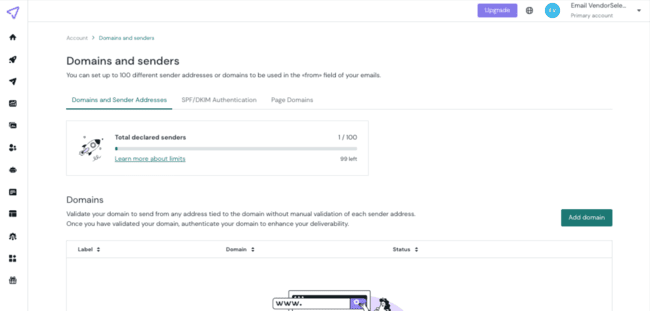
If you want to send transactional emails, you have to set up Mailjet’s Send API or SMTP Relay.
Mailjet Review: Email Marketing Platform

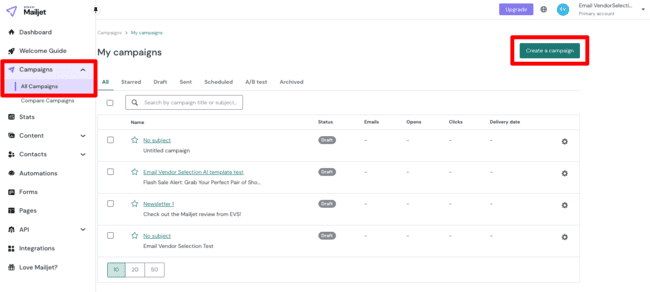
I found creating email marketing campaigns in Mailjet easy, and the navigation very straightforward. From the Campaigns menu, you simply click the Create a campaign button. Then it’s picking a contact list, and you’re ready to build.
Email templates in Mailjet
The first step in creating a campaign is picking a template.

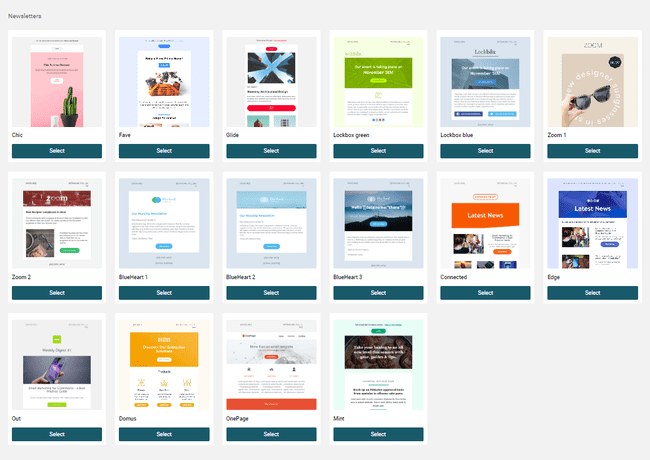
Mailjet has 70+ email templates to choose from. That’s about a par number. I know of services that offer a lot more and a lot less. The designs are of a reasonable quality but mostly simple. The simple templates are easy to edit. There’s a good choice of newsletter templates, and the rest of the designs are mostly for promotional emails, split into themes like seasonal, events, and travel.
If you don’t want to use Mailjet’s templates, the AI template builder makes starting from scratch much easier. Just pick your email type: newsletter, promo, event, ecommerce, announcement, or seasonal. Add a quick prompt describing what you want. Then choose the default theme or automatically pull in your fonts, colors, and logo from your site. The AI builds your template in seconds. From there, you can fine-tune everything with the drag-and-drop editor until it looks exactly how you want.
Developers can code and save their own templates in HTML.
Setting up email campaigns


After choosing a template, you’re prompted to finish the campaign setup. The most important part here is adding a subject line. Mailjet helps you out in 2 ways:
- Ask AI. You tell Mailjet’s generative AI tool what your campaign is about. And it suggests subject lines for you.
- Personalize the subject line. Insert variable lets you add contact details linked to an email address. The most common example is adding the recipient’s name.
This is also where you can set up A/B testing. At the top left, you’ll see a box marked Version A. From here, you can create up to 10 versions of the same email. You can change anything you like. Subject lines, images, text content. You can create and test 10 completely different emails if you like. Mailjet is one of the most flexible email marketing platforms for split testing I’ve come across.
Mailjet’s Brand Kit makes staying on-brand refreshingly simple. Instead of manually adjusting colors, fonts, logos, and buttons for every campaign, you define your brand elements once and reuse them across templates. You can even generate a kit automatically from your website URL or build it from scratch. I especially like the smart logo component, button styling controls, and Brand Kit toggle, which keeps new sections consistent as you design.
One final and critical part of the setup is adding a sender address. To do this, you have to first authenticate your email domain. You get prompted to do this the first time you click on sender address.
Creating and sending newsletters with Mailjet
Set up complete, it’s time to design your campaign email. I decided to test out creating a simple newsletter. All templates are fully customizable. And once you’ve finished setting up, you go straight into the drag-and-drop editor.
I found Mailjet’s email builder very intuitive to use. It’s got a very simple, uncluttered layout. You can find everything easily.

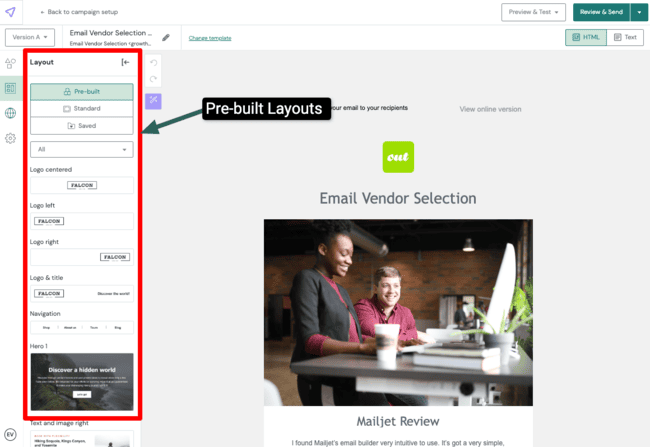
The editing tools are split into 4 menus on the far left. Elements, Layouts, Languages, and Settings.
I like how you can customize email layouts. The Standard layout containers are blank boxes divided into columns. But the pre-built blocks take things up a level. They’re like mini-templates you drop into your design. You can choose from logos, hero content boxes, text and image combinations, product listings, and more. You get elements, positioning, and styling all combined and ready to customize.
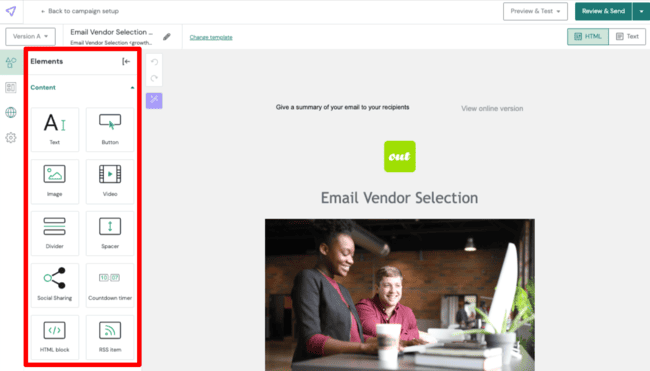
Once you’ve arranged your layout blocks, it’s time to drop in your Elements. Text, images, buttons, etc. Mailjet doesn’t have a huge choice. But it covers the basics.

As for editing the content, the Mailjet editor has its pros and cons. I turned my template into the above design in just a few minutes. There’s no doubt it’s quick and easy to use. When you click on a content block, a contextual editing menu appears. Above, you can see the text editing menu. Note the Ask AI and Variables. You can get help from the gen AI tool to write your content. You can also personalize in the same way you can the subject lines.
But I also found some of the navigation clunky. It’s not always easy to see which element or container block you are clicking on. Sometimes sections remain highlighted while menus for others are displayed.


I also only stumbled across the dynamic content feature shown above by accident. For this, you have to click outside the main content blocks. It’s a great tool for advanced personalization. It means you can set conditions for when certain sections of content appear. And that means you can change them up for different audiences. I’d love to see dynamic content flagged up a bit better!
Finally, the Settings tools set design styles for the whole template. You can set background colours, default container sizes, and edit pre-set text styles. Page design locking is useful for multi-user collaboration in teams. It lets you set permissions on who can edit a template.
Another feature that stands out is Mailjet’s collaborative editing. Team members can work inside the same template at the same time. You see edits instantly, sections someone’s working on are clearly highlighted, and built-in comments make feedback easy. There’s even a live preview so everyone can spot design or formatting issues as they happen. For marketing teams, this speeds up approvals, reduces version confusion, and makes the entire email production process more efficient.
Create an email campaign in Mailjet for free
Managing contacts in Mailjet

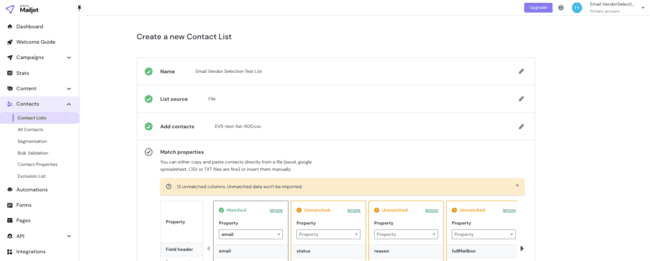
Mailjet packs a lot in the Contacts tab. I’ll come to the Form Builder and Validations later. First, I wanted to explore how you add existing contacts to Mailjet. And then how you manage and use contact data.
Creating contact lists and adding existing contacts is very easy. You can import .csv or .txt files directly. One slightly strange thing is that Mailjet only data matches email addresses automatically. All other contact field data gets flagged as ‘unmatched’. You have to create fields like First Name, Last Name, Location etc yourself. This is a lot of work for very common data.
The flip side of this is that you get complete control over contact data. On the Contact Properties page, you can create your own custom data fields. This translates into near open-ended freedom to store any contact information you like.

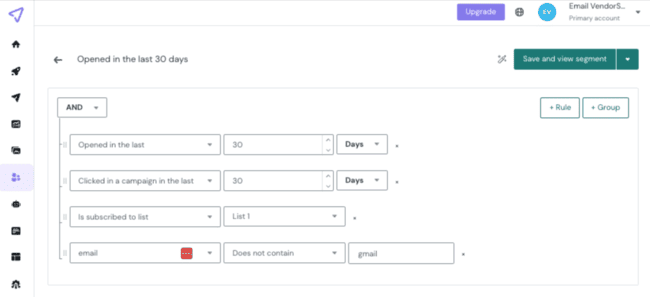
This has huge benefits for how you target your campaigns. The more data you have stored about your contacts, the more precise your segments can be. Mailjet doesn’t just let you segment by an open-ended number of contact properties. You can also filter by activity. So things like whether someone has opened an email from you. Or clicked on a campaign link in a specified timeframe.
You can stack as many and/or conditions as you like. Combined with the custom attributes, Mailjet’s segmentation is as flexible as any I’ve seen.

Mailjet also gives you an AI Assistant for segmentation, which makes building advanced filters much faster. Instead of manually adding conditions in the logic builder, you can simply describe the audience in plain English. For example, “Contacts who click a link an email in the last 60 days and are in Italy.” The AI translates that into structured segmentation rules automatically. You can review and edit everything before saving, and if your request is unclear, it will suggest alternatives or ask for clarification. It’s practical, especially when you’re building more complex segments.
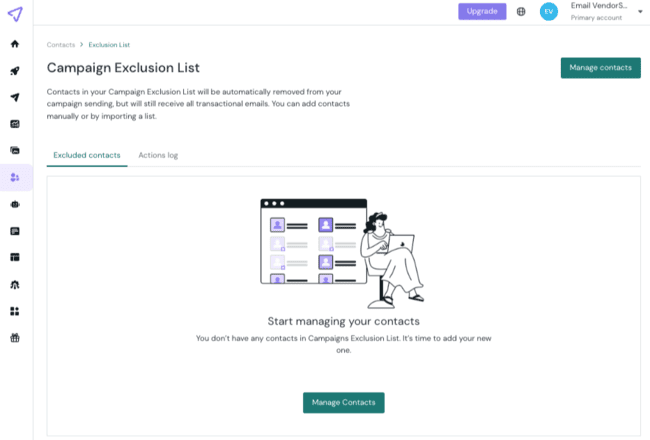
Don’t forget the exclusion list. Contacts added to the exclusion list are automatically blocked from receiving your emails. This is important if they unsubscribe or flag you as spam. You are potentially breaking privacy laws if you keep sending to contacts who unsubscribe.
Some email marketing software automatically adds unsubscribed contacts to an exclusion list. Mailjet only removes unsubscribed contacts from the list. You have to add them to the exclusion list manually.
Save time with Email Automation
Mailjet has upgraded its automation builder since our review. And it’s a big improvement over the older version. Instead of a few predefined sequences, you now get a visual automation builder where you can create custom workflows. You add steps for triggers, emails, conditions, timers, contact list actions, and property updates.
The new triggers and conditions make Mailjet’s automation builder much more customizable. You can trigger or branch workflows based on opens and clicks. Filter by campaign, tags, or even specific sender addresses. And combine filters using AND/OR logic. That gives you much more control than simple time-based sequences.


I really like that each automation step is color-coded and paired with an icon, which makes the workflow easy to scan.
Mailjet has 5 automation triggers. You can start a workflow when someone subscribes to a list, when a contact property updates, or when a contact opens or clicks an email. And you can add a segment to any trigger, which makes it far more precise and customizable.
Conditions make Mailjet’s automation builder much more capable than the older sequence editor. Segments and custom filters let you direct contacts down different workflow paths. For example, you can check whether someone opened an email in the last 30 days. You can add 20 conditions in a single block. Each condition connects directly to Mailjet’s segmentation, so you can use contact properties, activity, or custom data. This lets you build workflows that respond to real engagement instead of just sending emails on a fixed schedule.

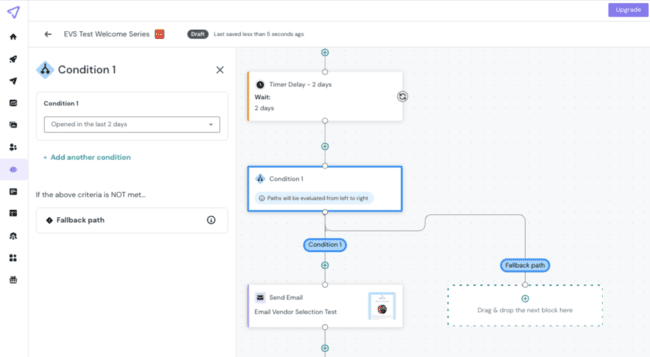
The event block pauses the workflow until a specific action happens. Like subscribing to a list, updating a contact property, opening or clicking an email, or triggering an external event from your site or app. You can wait until someone clicks a pricing link before sending a follow-up email. This makes workflows feel more responsive and tied to user behavior.
Mailjet also supports external events via webhooks. So when someone completes a purchase, starts a trial, or renews a subscription on your site or app, you can trigger a workflow automatically.
Timer blocks control when the next step happens. You can delay contacts by minutes, hours, or days using a simple delay timer. You can also use date-based timers, such as sending an email on a specific date or on a contact’s birthday. This makes it easy to schedule time-sensitive campaigns, onboarding sequences, or milestone emails. You can even choose the exact time of day and allowed send days, which adds useful precision.
Mailjet also includes exit blocks, which define where a workflow ends. Each path in your workflow can have its own exit point, depending on how contacts move through. You can also allow contacts to re-enter the workflow later if they meet the trigger criteria again. This works well for recurring campaigns or ongoing engagement sequences.
There are 12 workflow templates for common use cases like welcome series, onboarding sequences, re-engagement campaigns, and lead nurturing. You can start from one of these or build from a blank canvas.

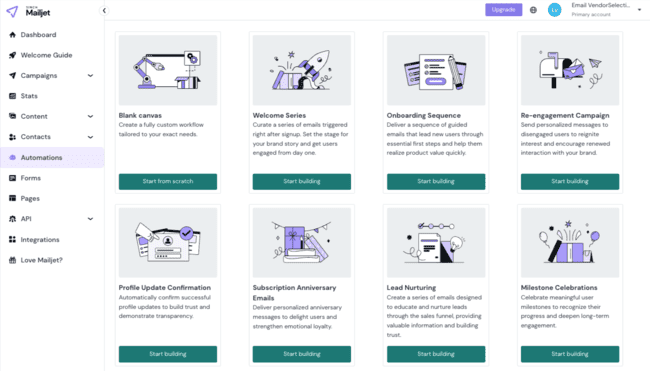
The workflow builder feels modern and capable. You can create workflows based on behavior, timing, and external events, with a clean visual interface. It delivers customization while staying easy to manage.
Setting up transactional emails with Mailjet Email API
Mailjet is the sister platform of Mailgun. There’s some crossover between the two. For example, Mailjet benefits from Mailgun’s outstanding deliverability. Another example is transactional emails.
There are two sides to transactional emails in Mailjet. You could call them the creating and sending sides. Creating a transactional email is much the same as creating a marketing campaign email. Although, once again, the tools are a little hidden. You have to go through Templates > Email Templates before you see the Transactional option.


As with marketing emails, building starts with templates. There are 20 transactional templates to choose from. Again, the designs are mostly simple. But there are templates covering most reasons for sending transactional emails. Confirmations, receipts, account updates, support ticket acknowledgement.
The rest of the building process is the same as campaign emails. Same editor, same tools. But sending your transactional email is very different.
Transactional emails aren’t sent in bulk like email campaigns. They are sent one at a time, triggered by a particular event. But you can’t use automation workflows to set up transactional sending in Mailjet. Instead, you have to use its Send API or SMTP relay.


These are tools borrowed straight from Mailgun. The Send API is one of the best around. Its big USP is exceptional deliverability rates. You can be confident that nearly all your transactional emails will arrive safely. Mailjet backs this up with some of the most detailed performance analytics I’ve seen. So if an email doesn’t land right, you will see exactly why.
Check out our full Mailgun review to find out more about its features, pros, cons, and pricing.
But there’s no escaping that Send API is a developer’s tool. Mailjet publishes all the documentation you need for setting up and working with an API. Including libraries for working with different coding languages. But you have to know what you’re doing with code.
Mailjet’s infrastructure also proves itself at scale. Travel platform Outdooractive sends over 3.5 million personalized emails per week using Mailjet. And maintains delivery rates above 96% and a spam rate below 0.01%. The combination of strong segmentation, list hygiene tools, and reliable sending infrastructure helps Outdooractive deliver highly targeted campaigns consistently without damaging sender reputation.
Validating Emails with Mailjet


Mailjet’s Validations tool is in the Contacts menu. Email validation means checking that email addresses in your list work. Inactive accounts and fake addresses cause bounces and hurt your deliverability rates. So being able to weed them out is a big strength of Mailjet. A lot of email marketing platforms don’t offer any sort of email validation.
Mailjet’s email validation is easy to use. You can run checks on existing lists in your account. Or upload new addresses, either individually or in bulk. The results are straightforward. A dashboard shows how many addresses in your list are deliverable, undeliverable, disposable or unknown. Disposable accounts are temporary email addresses that will bounce once they expire.
There’s no breakdown of why addresses are undeliverable. And you have to download a csv. file to get a breakdown address by address. This adds a step in removing unwanted addresses from your lists.
Forms and Landing Pages in Mailjet

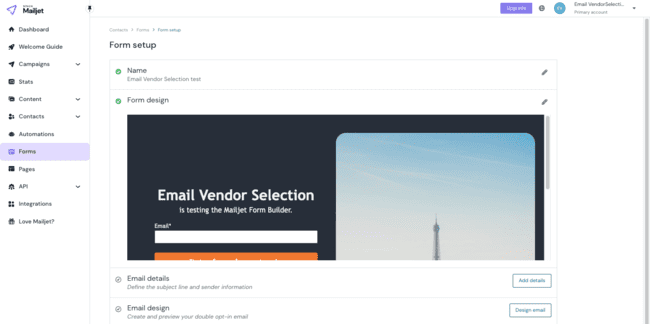
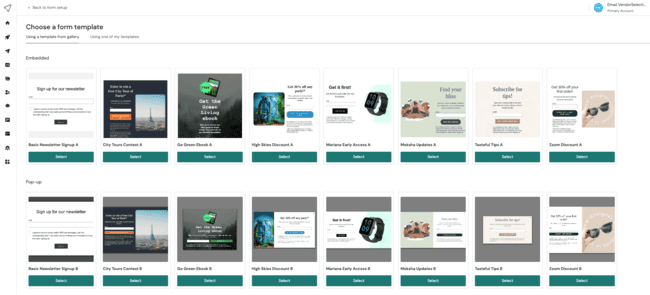
Form design starts with choosing a template. Mailjet only has 8 form templates, so again the choice isn’t huge. But there are some nice, tasteful designs. They range from basic newsletter sign-ups to discounts and digital products like ebooks. All 8 templates have popup and embedded versions.

I love that the form builder is identical to the email builder. A lot of email marketing platforms end up with different editor interfaces for emails, forms and landing pages. I find it helpful when they are all the same. You get familiar with how they work so much quicker.

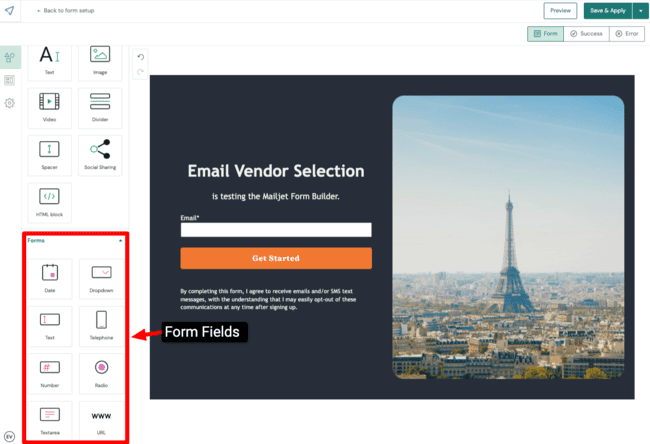
The big strength of the form builder is how easy it is to use. You just drop the elements you want into position. You can choose from 8 different field types in Mailjet. These include pre-formatted fields for phone numbers, dates and web URLs. For every field type, you are prompted to add a contact property. To map the data into your contact list correctly.

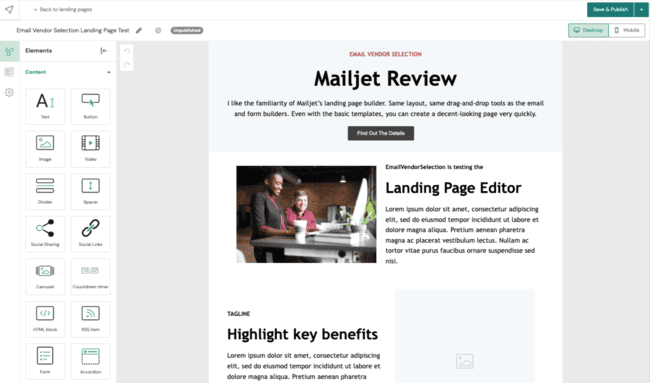
Mailjet has a standalone Pages section with all its landing page tools. To be honest, they’re pretty basic. For a start, there are just 3 layout templates to choose from. I’d like to see more fully designed templates to help people along.


I like the familiarity of Mailjet’s landing page builder. Same layout, same drag-and-drop tools as the email and form builders. Even with the basic templates, you can create a decent-looking page very quickly. And although Mailjet chooses not to have landing pages and forms together, you can add a form to a page. You simply pick a form you’ve built previously and drop it in.
Reporting and Analytics in Mailjet


Mailjet’s analytics impressed me. It’s very thorough at tracking all the core email campaign performance metrics. You can break these down into 2 main sections:
- Engagement statistics: Open, click, unsubscribe, and marked as spam. Some email marketing services will only focus on these.
- Deliverability statistics: Mailjet reports whether emails are delivered, blocked, hard and soft bounces. It also records emails that are queued for sending. And re-attempted sending is logged as retrying.
This is a strong range. But what I really like is how Mailjet uses and presents this data in different ways and different places. On the main dashboard, you get an activity overview of the last 24 hours. You can pick and choose which metrics you view. And filter a list to see which addresses have bounced, which contacts have opened etc.
On the Stats page, you can view the same stats by day, week, month or up to a year.


The My Campaigns page provides a summary of open and click rates for each campaign. Opening a sent campaign gives you a detailed performance breakdown. You can see which links in an email got the most clicks. And how your campaign performs by inbox provider. You can choose 10 campaigns at a time to compare.
Mailjet’s click maps make it easy to see where recipients click in your emails. You get a visual overlay that shows which links people clicked. Hovering over a link shows the percentage of total clicks, and the platform highlights the corresponding link in your email.
You also get a detailed links list that shows click performance for each individual link. If the same link appears multiple times, Mailjet tracks them separately. This helps you understand which positions and CTAs perform best. It’s a useful feature for optimizing layout, improving link placement, and refining future campaigns based on engagement data.
For all of the above to work, you have to activate email tracking in your account. This is done in Account settings > Tracking settings.
Mailjet has bot activity detection to keep your campaign stats accurate. It automatically filters out automated opens and clicks from security scanners, so your engagement metrics reflect real human interactions. This avoids misleading data from non-human activity.
Since our first review, Mailjet added landing page analytics. You can see total visits, link clicks, and form submissions. A visual chart shows activity over time, which makes it easy to spot trends and measure engagement. This gives you a clear view of how your landing page performs after launching a campaign.
Landing page stats show useful audience insights. Next to unique visitors pageviews, you’ll find a breakdown by device and country. If your landing page connects to an email campaign, Mailjet also shows which recipients visited and when. That makes it easier to connect email with landing page performance.
Get started with Mailjet for free
Mailjet Integrations & API

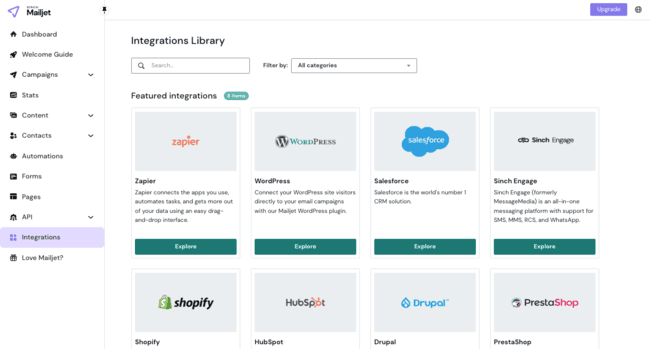
Mailjet comes with 29+ direct integrations with third-party software. Some highlights are:
- CMS and website builders like WordPress, Drupal, and Joomla.
- Ecommerce platforms including WooCommerce, Prestashop, and BigCommerce.
- Marketing automation services such as Vero, Ongage, and Leadliason.
- Lead generation tools like ManyContacts, Optimonk, and Poptin.
- Text messaging software like MessageMedia.
- Integration platforms like Zapier, Cloud Elements, and Skyvia.
The WordPress integration lets you connect WordPress form builders to Mailjet. WordPress form builder plug-ins offer enormous choice. And they are the easiest way to add forms to WordPress pages. But you can still sync captured leads into your Mailjet contacts lists. And use them in campaigns.
Developers can also use the API to integrate any platform of their choice.
Mailjet’s API also delivers strong results for SaaS companies. My AskAI uses Mailjet to send real-time AI-generated email replies, processing thousands of emails per month reliably. Where deliverability is critical for automated support and transactional workflows. This resulted in a new AI email assistant feature that resolved 75% of support tickets automatically.
How Much Does Mailjet Cost? Pricing and Plans


Mailjet is great value for money. The Essential plan starts at $17 a month for 15K emails and unlimited contacts. This gives you basic campaign creation tools, but no automation or landing pages. But you do get 500 email validations a month.
The Premium plan starts at $27 a month for 15K emails. You get all advanced features for this price, including dynamic content, A/B testing, and all analytics. You can also have 20 users on the same account, which makes it a superb value for teams.
| $17 Essentials plan | – 15,000 emails – Unlimited contacts – 500 email validations – SMTP and email API |
| $37 Essentials plan | – 50,000 emails – Unlimited contacts – 500 email validations – SMTP and email API |
| $105 Premium plan | – 100,000 emails – Unlimited contacts – 2,000 email validations – SMTP and email API – Automation – Advanced Statistics – Dynamic Content – A/B Testing – Landing Pages – Dedicated IP |
| $250 Premium plan | – 250,000 emails – Unlimited contacts – 2,000 email validations – SMTP and email API – Automation – Advanced Statistics – Dynamic Content – A/B Testing – Landing Pages – Dedicated IP |
You can sign up for a free plan with 1,000 contacts and 6,000 emails a month. You can send a maximum of 200 emails per day. You’ll get the drag-and-drop email editor, form builder, and basic statistics.
Mailjet Customer Support

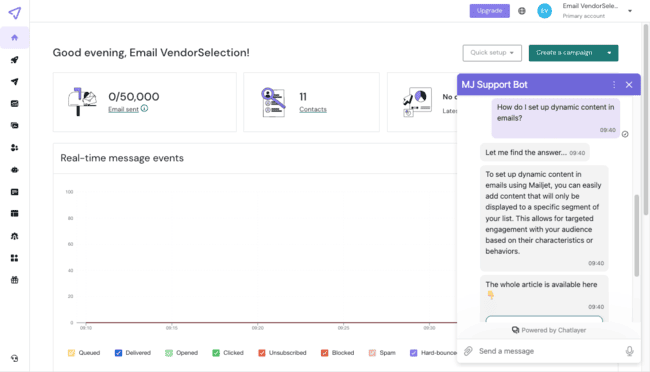
Mailjet’s standard customer support focuses on guided self-help via an online knowledge base. And email tickets when you need assistance from the support team.
There are 2 ways to access support on every page. The question mark on the top right opens a drop-down menu. Here you’ll see links to User Guides and the Support Center for creating and managing tickets.
There’s also an AI Customer Assistant Chatbot. The bot will either direct you to relevant resources to answer your query. Or help you send a ticket if you can’t find the answer.
You get phone and live chat support on the Premium plan. But this excellent customer support is only available if you pay for 50,000 emails a month.
Mailjet also runs live Email Academy training sessions every quarter. These sessions cover practical topics like deliverability, automation, and campaign optimization. They’re available in English, French, Spanish, and German.
Final Conclusion: Is Mailjet the right email tool for you?
Mailjet is a simple, affordable email marketing platform. Some of my highlights are unlimited contacts on all plans and email validation. I also think the quality of its analytics, high deliverability rates, and flexible A/B testing make it great value. With Mailjet, you can get premium email marketing performance at bargain prices.
I’d recommend Mailjet if you’re a small business looking to grow your email marketing. But still want to keep a lid on costs. It’s especially powerful if you have developers on your team who can make use of its API.
Mailjet Frequently Asked Questions (FAQ)
Mailjet Alternatives
Mailjet vs. MailerLite
MailerLite is arguably Mailjet’s most direct competitor. Both prioritise affordability and ease of use. MailerLite edges both. Paid plans start at $9 a month versus $15.30 for Mailjet. But with MailerLite, you get unlimited emails compared to Mailjet’s unlimited contacts. So you have to work out what means best value to you. MailerLite’s free plan is also more generous, offering double the number of free emails. Check out our full MailerLite review and pricing guide to compare them.
MailerLite has better email marketing automation and more integrations. With Mailjet, you get built-in email validation for protecting sender reputation and more advanced analytics.
Mailjet vs. GetResponse
Mailjet is great if you want to grow your email marketing affordably. GetResponse is the better choice if you want to grow beyond email marketing. It has 3 pricing plans. The cheapest focuses on the basics of email marketing. The middle tier adds marketing automation. The top tier focuses on advanced ecommerce marketing. And leans heavily into supporting sales and revenue generation.
GetResponse’s cheapest tier is the most similar to Mailjet. Both combine campaign-building with straightforward lead generation and basic automation. GetResponse is cheaper to get started with. But with Mailjet you get unlimited contacts. GetResponse has more integrations and 24/7 live chat support. Mailjet wins on analytics, email validation and transactional emails. The latter isn’t available until GetResponse’s most expensive plan. Find out more in our full GetResponse review and pricing guide.
Mailjet vs. ActiveCampaign
Mailjet improved its automation builder a lot recently but it still doesn’t come close to ActiveCampaign’s automation features. If automating your campaigns matter to you, ActiveCampaign is an obvious alternative. It’s arguably the best marketing automation platform for SMEs out there. Its excellent workflow editor combines intuitive use with sophisticated features. And it comes with 900+ automation templates to get started with. Learn more in our full ActiveCampaign review and pricing guide.
Like Mailjet, ActiveCampaign starts at $15 a month. But you pay more as your contact list grows. You also have to go up through the tiers to unlock the premium automation features. Mailjet is a better value for the basics of creating and sending email campaigns. It also has a free tier, which ActiveCampaign doesn’t.
Mailjet vs. Brevo
Brevo is one of Mailjet’s strongest competitors, especially for small businesses. Both platforms offer affordable pricing, unlimited contacts, and strong deliverability. Brevo stands out for its built-in CRM and multi-channel marketing, including SMS, WhatsApp, and chat. Check out our Brevo review and pricing guide to compare the platforms.
Mailjet is stronger for transactional emails and developer use cases. Its API, email validation tools, and advanced analytics give you more control over email performance. Brevo has better built-in CRM and multi-channel tools. Mailjet is the better choice if email is your primary focus and deliverability matters most.
Mailjet vs. Moosend
Moosend is a strong alternative if you’re looking for advanced automation without the high price tag. It offers more automation triggers, workflow templates, and behavioral targeting options than Mailjet. Its automation builder is one of the most customizable available at this price point. Read our Moosend review and pricing guide for comparison.
Mailjet has the advantage in deliverability, analytics, and transactional email. It’s also better suited for developers thanks to its API. Moosend is better for marketing automation. Mailjet is better for email infrastructure, deliverability, and scalability.
Mailjet vs. Mailchimp
Mailchimp is one of the most well-known email marketing platforms. It offers marketing tools, including automation, landing pages, and audience management. But Mailchimp becomes expensive quickly as your contact list grows. Many businesses start looking for Mailchimp alternatives because of its pricing and contact-based billing model. Learn more in our full Mailchimp review and pricing guide.
Mailjet is the better choice if you want affordable, scalable email marketing. It offers unlimited contacts on all paid plans, built-in email validation, and excellent deliverability. Mailjet also has strong analytics and a powerful API for transactional emails. Mailchimp offers more marketing features overall, but Mailjet delivers better value, stronger email infrastructure, and lower long-term costs.